| Article information | Details |
|---|---|
| Product owner / department | CAPL |
| Tier 2/3 support contact | CAPL Customer Support connect4learning@kaplanco.com, ext. 3487 |
| Source last updated | October 20, 2026 |
Quick Navigation
| # | Section | Use for |
|---|---|---|
| 1 | Curriculum Kit Overview | Kit editions/languages, purchasing, replenishment, missing items |
| 2 | Online Portal | Overview of the Connect4Learning Online Portal and core features |
| 3 | Licensing & Subscriptions | Online portal license count, price, expiration, renewal, setup |
| 4 | Account Access & Support | Online portal login and self-service support resources |
| 5 | CAPL Contacts | Customer support |
| CAPL Sales Reps | CAPL Sales Reps Contact | |
| 6 | Key Links | Quick access to Connect4Learning links |
1. Connect4Learning Curriculum Kit Overview
What Connect4Learning curriculum kit options are available?
Connect4Learning is a comprehensive, interdisciplinary Pre-K curriculum exclusive to Kaplan Early Learning Company. The complete classroom kit includes the core print and hands-on materials needed for implementation, including six unit manuals, teacher and administrator handbooks, formative assessment tools, classroom visuals and posters, classroom materials, a large card set, a classroom book set, and consumables. Each complete classroom kit includes one year of Connect4Learning Online Portal access.
Current kit options:
- Connect4Learning Curriculum Kit — 1st Edition
- Connect4Learning Curriculum Kit — 2nd Edition, English
- Connect4Learning Curriculum Kit — 2nd Edition, Spanish
Resources: Kaplan Connect4Learning page | Connect4Learning website
Tier 1 action: Refer customers who have questions about the different editions and options to their designated CAPL Sales Representative.
How does a customer purchase a Connect4Learning curriculum kit?
Connect4Learning curriculum kits are purchased through a CAPL Sales Representative, so they can confirm the appropriate edition/language, quantity, and subscription options, and provide a current quote.
Tier 1 action: Refer all curriculum kit purchase and quote requests to the designated CAPL Sales Representative.
How does a customer purchase kit replenishment items?
The classroom kit includes consumable materials that are used during implementation and should be replenished as needed. Kaplan identifies classroom consumables as an annual replenishment need after the initial implementation year; these include the formative assessment materials, science journals, stickers, and other child-use items.
Tier 1 action: Refer replenishment-item requests to the designated CAPL Sales Representative for the correct items and a quote.
How many boxes are in the kit?
The Connect4Learning kit is shipped in 9 boxes. Review the Connect4Learning shipment contents lists below to see the contents of each Connect4Learning shipment, should an item or box be missing.
- C4L Master Box List 2nd Edition.pdf
- C4L Master Box List 2nd Edition Spanish
- C4L Master Box List 1st Edition
Tier 1 action: Support the customer if they are missing a box or kit item.
2. Connect4Learning Online Portal
What is the Connect4Learning Online Portal?
The Connect4Learning Online Portal is a curriculum management platform that helps educators plan instruction, access digital resources, record formative assessment observations, upload children’s work samples, manage classroom data, and support family engagement across devices.
View this self-guided click-through demo of the Connect4Learning Online Portal; no login is required: Connect4Learning Online Portal Overview.
Does the online portal replace the Connect4Learning classroom kit?
No. The complete classroom kit is required for full implementation of the Connect4Learning curriculum.
Note: Customers receive one (1) free year of Online Portal access with the purchase of each Connect4Learning kit.
Note: Customers receive one (1) free year of Online Portal access with the purchase of each Connect4Learning kit.
Example: A customer purchases 10 kits for 10 classrooms, so they will also receive 10 online portal licenses—one for each classroom.
Connect4Learning kit resources:
Tier 1 action: If the customer wants to purchase a classroom kit, refer them to their designated CAPL Sales Representative.
What can educators do in the portal?
The portal supports the core implementation tasks below:
- Lesson planning: View and prepare weekly lessons and learning centers, set non-contact days, and keep lessons aligned to the school calendar.
- Student progress: Record formative assessment observations, teacher notes, and samples of child work.
- Family engagement: Invite families to the Parent Portal to view formative assessment data, notes, photos, and online math games.
- Curriculum resources: Access PDFs of unit manuals, cards, posters, read-alouds, parent engagement letters, and the Fidelity Checklist.
- Professional development: Access self-paced modules covering research-based teaching methods, project preparation, and implementation of the six units; modules include a certificate of completion.
3. Purchasing, licenses & subscriptions
Is Connect4Learning Online Portal access part of the Connect4Learning kit purchase?
Yes. Customers receive one (1) free year of Online Portal access with the purchase of each Connect4Learning kit.
Example: A customer purchases 10 kits for 10 classrooms, so they will also receive 10 online portal licenses—one for each classroom—for the first year of implementation.
Each additional year after the initial implementation year is $349.95 per classroom (item #84993). Multi-year subscriptions are also available.
Tier 1 action: Refer the customer to their designated CAPL Sales Representative for a quote.
How many portal licenses does an organization need to purchase when renewing?
For renewals, organizations should purchase one Connect4Learning Online Portal license for each classroom using the Connect4Learning curriculum. Cost per license is $349.95 per classroom. Multi-year subscriptions are also available.
Tier 1 action: Refer the customer to their designated CAPL Sales Representative for a quote.
Are multi-year subscriptions available?
Yes. Multi-year subscriptions are available.
Tier 1 action: Refer the customer to their designated CAPL Sales Representative for options.
When does portal access expire?
Portal access expires one (1) calendar year after purchase/setup.
Will customers receive expiration reminders?
Yes. Renewal reminder emails are sent to the organization administrator 90, 60, and 30 days before the license expires.
Do licenses automatically renew?
No. Licenses do not currently auto-renew. Customers will reach out when they are ready to renew.
Tier 1 action: For renewal, direct the customer to CAPL Customer Support - connect4learning@kaplanco.com
What happens after portal licenses are purchased?
The purchaser receives an automated Organization Setup Form via email to provide organization information and portal setup preferences.
- After the completed form is submitted, initial organization setup is completed within 1–2 business days.
- A CAPL team member follows up with next steps for adding users, children, classrooms, and school-year setup.
4. Account access & support resources
Where does a user log in?
Connect4Learning Online Portal login: https://c4l.kaplanco.com/login
What happens if a user cannot remember their password?
Refer the user to select Forgot Password on the Connect4Learning Online Portal login page. This sends an email with a password reset link and instructions for resetting their password.
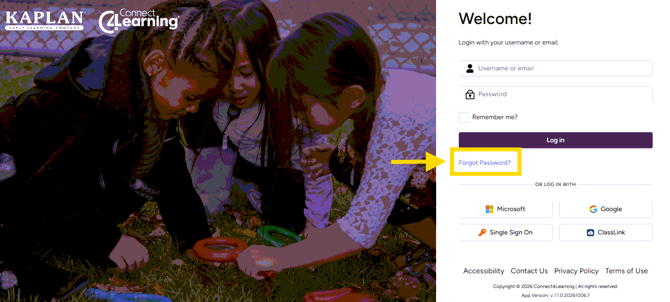
Should a user still need assistance after resetting their password, refer them to CAPL Customer Support - connect4learning@kaplanco.com
Where can users find setup and how-to help?
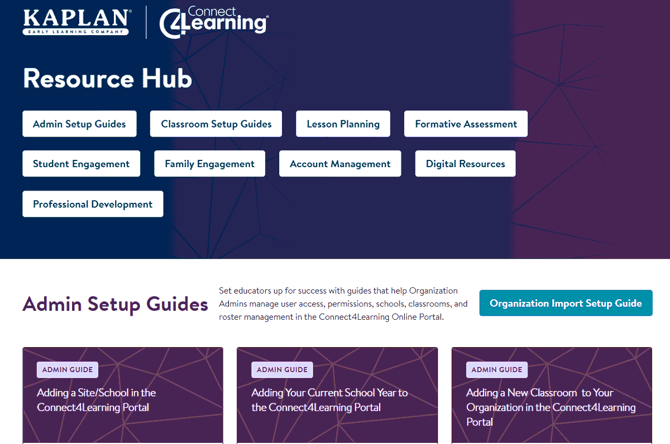
Users can access help guides and videos for portal setup and functions, including adding users, students, and classrooms.
- In the portal: Select SUPPORT from the navigation menu.
- Connect4Learning Resource Hub: https://info.kaplanco.com/c4l-portal-resources
How can a user submit a support request?
Users can submit a support request ticket through the Connect4Learning Resource Hub, located at the bottom of the page. The request goes to the CAPL Customer Support pipeline, and a team member will follow up within 1–2 business days.
Quick triage for Tier 1
| Customer need | Best next step |
|---|---|
| Needs login URL | Provide c4l.kaplanco.com/login. |
| Needs setup/how-to instructions | Direct to SUPPORT in the portal or share the Connect4Learning Resource Hub. |
| Needs license renewal | Refer to a CAPL Sales Representative or CAPL Customer Support. |
| Needs help beyond available guides | Refer to CAPL Customer Support, or the user can submit a support ticket in the C4L Resource Hub. |
5. CAPL contacts
How do I contact C4L Customer Support?
- Email: connect4learning@kaplanco.com
- Direct line: 1-888-808-2366 or extension 3487
When should I refer a customer to a CAPL Sales Representative?
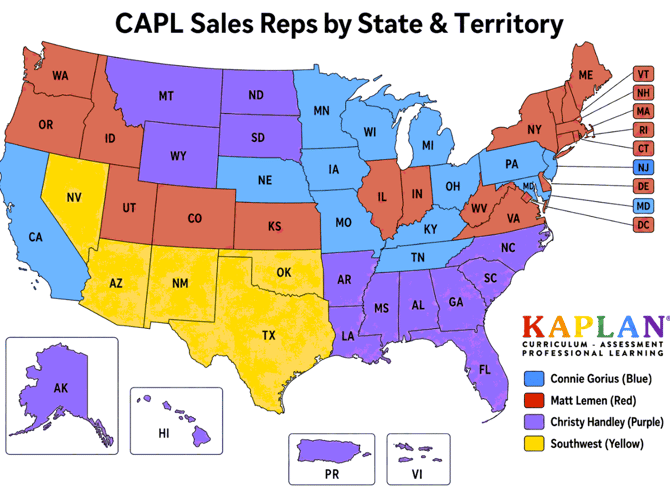
Refer customers to their designated CAPL Sales Representative for classroom kit purchases, multi-year subscription options, and other sales-related questions.
CAPL Sales Representatives
| Representative / territory | Extension / next step | |
|---|---|---|
| Connie Gorius | cgorius@kaplanco.com | 3470 |
| Christy Handley | chandley@kaplanco.com | 3478 |
| Matt Lemen | mlemen@kaplanco.com | 3471 |
| Southwest Territory | — | Refer to CAPL Customer Support until the position is filled. |
6. Key links
| Resource | URL |
|---|---|
| Online Portal Login | https://c4l.kaplanco.com/login |
| Connect4Learning Online Portal Resource Hub | https://info.kaplanco.com/c4l-portal-resources |
| Connect4Learning Online Portal Click-Through Demo — no login required | https://demo.storylane.com/share/qh9muwsdtjxa |
| Connect4Learning Kaplan Landing Page | https://www.kaplanco.com/C4L/ |
| C4L Purchasing Guide | https://blog.kaplanco.com/connect4learning-buying-guide |
| Connect4Learning Curriculum Website | https://www.connect4learning.com/ |
Internal Use | Kaplan Connect4Learning Tier 1 Guide | Updated October 2026