

| Article detail | Value |
|---|---|
| Product Owner / Department | CAPL |
| Tier 2/3 Support Contact | CAPL Customer Support, decasupport@kaplanco.com 1-888-808-2366, EXT 3487 |
| Last Updated | October 20, 2026 |
Quick Navigation
| # | Section | Use for… |
|---|---|---|
| 1 | At a Glance | DECA/e-DECA overview, age ranges, print/online basics |
| 2 | DECA Print Kits & Resources | Core kits, record forms, manuals, companion resources |
| 3 | e-DECA Purchasing, Licensing & Ratings | Annual license, rating types, quantities, setup for the e-DECA online platform |
| 4 | Account Access & Support Resources | Login, password reset, Help tab, support |
| 5 | e-DECA License Renewals | Renewal, rollover ratings, changing rating type |
| 6 | Quotes & Large Purchases | When to refer customers to Sales or DECA Support |
| 7 | Quick Triage for Tier 1 | Common customer questions and recommended actions |
| 8 | Key Links at a Glance | Portal, purchasing, landing page, demo |
| 9 | CAPL Contacts | Customer and technical support |
| 10 | CAPL Sales Reps | Sales contacts and escalation |
1. DECA AT A GLANCE
| Product / Tool | Age Range | Purpose | Print? | e-DECA? |
|---|---|---|---|---|
| DECA-I/T | 4 weeks-36 months | Strength-based assessment of protective factors for infants and toddlers. | Kit/forms available | Available |
| DECA-P2 | Ages 3-5 | Strength-based measure of protective factors to support social-emotional development. | Kit/forms available | Available |
| DECA-C* (Clinical) | Ages 2-5 | Clinical form for select children already showing significant behavioral concerns; intended for qualified mental health professionals. *The DECA-C is designed to be interpreted by a qualified mental health or special education professional. A customer qualifications form must be submitted before use of the DECA-C. For more information on these qualifications, click here. |
Resources available | Available |
| e-DECA | Infant, toddler, preschool & preschool clinical | Online platform for entering DECA ratings, scoring, reports, strategies, and assessment history. | N/A | Annual license + ratings required |
- DECA is a strength-based social-emotional assessment system. e-DECA is the online assessment and planning platform used to enter ratings, score, report, and access strategies.
- Print DECA kits/resources and e-DECA access are separate purchasing paths. A customer may use print materials, e-DECA, or both depending on program needs.
- DECA-C is a clinical form intended for early childhood mental health consultants and other mental health professionals working with select children who already show significant behavioral concerns.
TIER 1 ACTION: Refer customers to their designated CAPL Sales Representative or DECA Support if they have questions about which assessment to purchase.
2. DECA PRINT KITS & RESOURCES
What print assessment options are available?
The DECA-P2 Preschool Program 2nd Edition kit, DECA-I/T Infant/Toddler Kit, and DECA-C Clinical kit, along with record forms, user/technical manuals, strategy guides, family resources, and related resilience products on the Kaplan DECA landing page.
Are replenishment and supplemental resources available?
Yes. The Kaplan DECA landing page lists separate record forms, manuals/guides, strategy resources, and companion products. Availability and pricing should be verified on the current product page at the time of purchase.
TIER 1 ACTION: For product-selection questions, bulk quantities, implementation planning, or uncertainty about which kit/resources are needed, refer to the designated CAPL Sales Representative.
3. e-DECA PURCHASING, LICENSING & RATINGS
How does an initial e-DECA purchase work?
Initial setup is a two-part purchase: (1) an e-DECA Annual License (Item #16701) to access the platform and resources, and (2) ONE rating type (quantity of ratings determined by number of children assessing). The annual license provides administrative access for an e-DECA program; the administrator delegates appropriate access to program staff.
e-DECA Annual License – Item #16701 – REQUIRED to access the system. Ratings are purchased separately to complete the assessments.
| Rating Type | Item | Current Listed Price* | How it works |
|---|---|---|---|
| DECA By Assessment / Single Rating | 26399 | $1.00 | One submitted assessment uses one rating. Best option if assessing only 1-2 times per year. |
| DECA By Child Rating | 16706 | $2.95 | Unlimited assessments for each purchased child during the 12-month contract year. Best option if assessing 3 or more times per year. |
| Conscious Discipline By Assessment / Single Rating | 29259 | $1.50 | One submitted assessment uses one rating; includes Conscious Discipline strategies. Best option if assessing only 1-2 times per year. |
| Conscious Discipline By Child Rating | 29519 | $4.50 | Unlimited assessments for each purchased child during the contract year; includes Conscious Discipline strategies. Best option if assessing 3 or more times per year. |
How many ratings should a customer purchase?
The quantity depends on the number of children to be assessed and how many times they expect to assess them. By Assessment ratings are purchased for the total number of submitted assessments. By Child ratings are purchased per child and allow unlimited assessments for that child during the contract year. The Kaplan e-DECA product page includes a purchasing calculator to compare options.
Can a program mix rating types?
Only ONE rating type can be used at a time. If a customer wants to change the rating type already established for the program, direct them to DECA Support before purchasing.
Is an Annual License required?
Yes, the e-DECA Annual License (#16701) is a required yearly purchase for access to the e-DECA system and resources. Purchasing ratings alone without an active Annual License will not grant access to the system.
Do ratings roll over year to year if they are unused?
Yes. Any unused ratings will be rolled over to the next license year. An annual license will still need to be purchased to renew.
Can customers buy more ratings during the license year?
Yes. If a program runs out of ratings, it may purchase additional ratings at any time, using the rating type for which the program is already configured.
TIER 1 ACTION: Refer customers to the website to purchase ratings, or if they need additional support beyond what can be provided from the answers above, refer to DECA Support
4. ACCOUNT ACCESS & SUPPORT RESOURCES
Where does a user log in?
e-DECA login: https://www.e-deca2.org/login.aspx
What if a user cannot remember their password?
Use the “Forgot Password” option on the e-DECA login page. The reset page accepts the username OR email address. If the email is not linked to the account, the user should contact the Program Administrator or DECA Support.
TIER 1 ACTION: Direct the user to Forgot Password first. If the reset email does not arrive, have them verify the account email with their Program Administrator and check spam/junk; then escalate to DECA Support if needed.
Where can users find e-DECA how-to resources?
Inside e-DECA, use the Help tab. Current support resources include the e-DECA User Manual, purchasing guidance, assessment forms and parent letters, DECA user/technical manuals, program strategies, administrator resources, reflective checklists, data dictionaries, and video demos for common administrative and rating tasks.
What common report-viewing issue can Tier 1 troubleshoot?
If a user clicks submit but does not see a report, a pop-up blocker may be preventing the report from opening. Ask the user to allow pop-ups from e-DECA and try again.
How can a user get technical support?
Email decasupport@kaplanco.com or call 1-888-808-2366. The e-DECA login page also directs users to their Program Administrator first when appropriate. When contacting support, the e-DECA Program ID is helpful to include.
TIER 1 ACTION: Use the e-DECA Help tab and Program Administrator as first-line resources for basic how-to/account questions; escalate unresolved access, data, technical, or scoring/interpretation questions to DECA Support.
5. e-DECA LICENSE RENEWALS
How does a customer renew the annual license?
The annual license must be renewed yearly from the date of purchase. Customers can purchase the e-DECA annual license through Kaplan or contact DECA Support for assistance/quote.
Do unused ratings roll over?
Yes. Unused ratings will roll over to the new year. Customers should consider their remaining balance before purchasing additional ratings at renewal.
Does a customer need to repurchase ratings every year?
Not necessarily. At renewal, ratings are purchased if needed. The customer should review unused ratings and expected assessment volume for the new contract year.
Can a customer change rating types at renewal?
Most customers wish to purchase the same rating type selected at program setup. If the customer wants to change rating type, they should contact decasupport@kaplanco.com
Can customers buy more ratings during the license year?
Yes. If a program runs out of ratings, it may purchase additional ratings at any time, using the rating type for which the program is already configured.
TIER 1 ACTION: For renewal questions involving a rating-type change, multiple e-DECA programs, or uncertainty about remaining ratings, refer to DECA Support before the customer places the order.
6. QUOTES & LARGE PURCHASES
Refer customers to the designated CAPL Sales Representative when they need:
- Help selecting among DECA print products or implementation options
- A sales quote or bulk purchase
- Multiple-site/program implementation planning
- Professional development or training
- Broader assessment/program planning
Refer to DECA Support for:
- Existing e-DECA program configuration or rating-type changes
- Technical access or portal issues
- Questions about remaining ratings or program IDs
- Assessment/scoring questions beyond Tier 1 troubleshooting
TIER 1 ACTION: Keep sales/product-selection questions with Sales and existing e-DECA account/configuration/technical questions with DECA Support.
7. QUICK TRIAGE FOR TIER 1
| Customer Says… | Recommended Action |
|---|---|
| “I want to start using e-DECA.” | Explain the two-part purchase: annual license + ONE rating type. Direct to the Kaplan e-DECA product page/purchasing calculator; refer complex needs to CAPL Sales Reps/DECA Support. |
| “How many ratings do I need?” | Base on number of children and expected assessment frequency. Explain By Assessment vs By Child; use the calculator for straightforward scenarios. |
| “Can I use both rating types?” | The purchasing guide directs programs to choose one rating type. Contact DECA Support before changing the program’s configured rating type. |
| “I ran out of ratings.” | Additional ratings can be purchased during the license year via the Kaplan e-DECA product page/purchasing calculator; purchase the same rating type already configured. |
| “My annual license is expiring.” | Renew the annual license via theKaplan e-DECA product page/purchasing calculator. Review unused ratings before purchasing more because unused ratings roll over. |
| “I cannot log in / forgot my password.” | Use Forgot Password. If email is not linked or reset fails, contact the Program Administrator or DECA Support. |
| “My report does not open.” | Allow pop-ups from e-DECA and retry. Escalate if the issue continues. |
| “Where are the e-DECA guides?” | Direct to the Help tab inside e-DECA for manuals, how-to guides, forms, strategies, and videos. |
| “What does this child’s score mean?” | Refer to DECA Support / appropriate qualified program staff. Tier 1 should not interpret assessment results. |
| “Which DECA assessment/product should we use?” | Refer to the designated CAPL Sales Representative for product-selection guidance. |
| “Do I need a print kit if I use e-DECA?” | Print resources and e-DECA are separate purchasing paths. Refer selection questions to the designated CAPL Sales Representative |
8. KEY LINKS
| Resource | URL |
|---|---|
| e-DECA Login | https://www.e-deca2.org/login.aspx |
| Kaplan Devereux Landing Page | https://www.kaplanco.com/devereux |
| e-DECA Annual License / Purchasing Page | https://www.kaplanco.com/product/16701P/e-deca-assessment-and-planning-system-20 |
| e-DECA Purchasing Guide | https://images.kaplanco.com/content/e-deca_purchasing_guide.pdf |
| e-DECA Self-Guided Demo | https://images.kaplanco.com/content/e-deca-demo-program–9-23.pdf |
| e-DECA User Manual | https://www.e-deca2.org/content/e-decainstructionmanual.pdf |
9. CAPL CONTACTS
How do I contact e-DECA Customer/Technical Support?
Email: decasupport@kaplanco.com
Phone: 1-888-808-2366, ext 3487
Support is included with e-DECA portal access. For efficient assistance, include the e-DECA Program ID when available.
When should I refer a customer to a CAPL Sales Representative?
Refer for product-selection questions, sales quotes, bulk or multiple-site/program purchases, professional development, implementation planning, and other sales-related questions.
10. CAPL SALES REPS
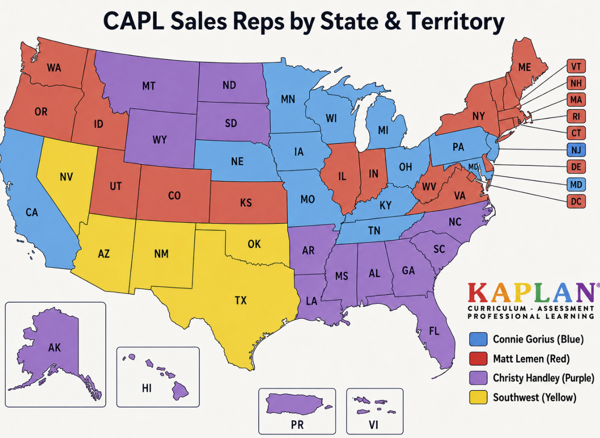
Use the contacts below when a customer needs product-selection guidance, a quote, or other sales-related assistance.
| Connie Gorius cgorius@kaplanco.com Ext. 3470 |
Christy Handley chandley@kaplanco.com Ext. 3478 |
Matt Lemen Southwest Ter |
Southwest Territory Refer to CAPL Customer Support until position filled |
Internal Tier 1 Customer Service Quick Reference | e-DECA / DECA