
| Article details | Information |
|---|---|
| Product owner / department | CAPL |
| Tier 2/3 support contact | CAPL Customer Support · lapsupport@kaplanco.com · 1-888-808-2366 or Ext. 3487 |
| Last updated | October 20, 2026 |

Quick Navigation
| # | Section | Use for |
|---|---|---|
| 1 | At a Glance | LAP instrument overview, age ranges, kit/portal basics |
| 2 | LAP Assessment Kits | Kit requirements, product links, replenishment items |
| 3 | Purchasing, Licensing & Subscriptions | Portal licenses, purchasing, expiration, setup |
| 4 | Account Access & Support Resources | Login, password reset, Resource Hub, support requests |
| 5 | LAP Portal License Renewals | Renewal quantity, kit needs, auto-renewal |
| 6 | Quotes & Large Purchases | When to refer customers to Sales |
| 7 | Quick Triage for Tier 1 | Common customer questions and recommended actions |
| 8 | Key Links at a Glance | Portal, Resource Hub, purchasing, and demo links |
| 9 | CAPL Contacts | Customer Support contact information |
| 10 | CAPL Sales Reps | Sales contacts and territory map |
1. LAP At a Glance
| Product | Age range | Customer service overview | Physical kit? | Online portal? | Kit replenishment items available? |
|---|---|---|---|---|---|
| LAP B-K | Birth–72 months | Preferred ongoing LAP assessment for new customers; combines and updates E-LAP and LAP-3 and provides a more streamlined experience from birth to kindergarten. | Optional but highly recommended | Required to administer and score | Yes, via Kaplan website or by quote |
| E-LAP | Birth–36 months | Ongoing assessment for infants and toddlers. | Required | Available | Yes, via Kaplan website or by quote |
| LAP-3 | 36–72 months | Ongoing assessment for preschool-age children. | Required | Available | Yes, via Kaplan website or by quote |
| LAP-D | 30–72 months | Norm-referenced full diagnostic assessment. | Required | Available | Yes, via Kaplan website or by quote |
| LAP-D Screens | Ages 3, 4, and 5 | Brief age-specific developmental screeners based on the LAP-D. | Required | Available | Yes, via Kaplan website or by quote |
Important to note
Tier 1 Action:
- Refer customers to their designated CAPL Sales Representative to inquire about which LAP instrument is the right fit for their program.
- LAP kits and online portal licenses are separate purchases. Online portal access does not come with the purchase of a physical kit.
- Refer to the LAP Landing Page for the LAP overview, available LAP instruments, kits, replenishment items, and portal purchasing information
2. LAP Assessment Kits
Does LAP B-K require a physical assessment kit?
A physical LAP B-K kit is highly recommended, but it is not required. Customers may gather the listed assessment materials themselves. A list of necessary materials is available on the online portal. The standardized kit is available for convenience and consistency.
Note: LAP B-K is an online assessment. Portal access is required as a separate purchase.
Note: LAP B-K is an online assessment. Portal access is required as a separate purchase.
Tier 1 action: For LAP B-K, explain that the physical kit is not required but is highly recommended; the online subscription is required to administer and score.
How does LAP B-K differ from the separate E-LAP and LAP-3 assessments?
LAP B-K is the newer combined birth-to-kindergarten all-in-one assessment, removing dated or unnecessary assessment items to provide a more streamlined assessment experience. Refer the customer to their designated CAPL Sales Representative for a recommendation.
Tier 1 action: If the customer is deciding between LAP B-K and LAP-3/E-LAP, refer them to their designated CAPL Sales Representative for a recommendation.
What physical materials are available for E-LAP and LAP-3?
Physical assessment kits, manuals, scoring materials, and replenishment items are available. These are LAP assessments. LAP-3 strongly recommends use of standardized kit materials for consistent administration. Kit purchase is required for assessment.
What physical materials are available for LAP-D3 and LAP-D Screens?
LAP-D uses standardized assessment materials, and a physical kit is available. LAP-D Screen kits are available for ages 3, 4, and 5 individually, as well as in a combined set. If the customer is unsure whether they need a Screen, full LAP-D, or another LAP instrument, refer them to Sales or LAP Support. Kit purchase is required for assessment.
Tier 1 action: If the customer is unsure whether they need a LAP-D Screen, full LAP-D, or another LAP instrument, refer them to their designated CAPL Sales Representative or LAP Support at lapsupport@kaplanco.com.
LAP-D Screens kits
| Age / kit | English | Spanish |
|---|---|---|
| Age 3 | LAP-D Screen 3 Kit | LAP-D Screen 3 Kit, Spanish |
| Age 4 | LAP-D Screen 4 Kit | LAP-D Screen 4 Kit, Spanish |
| Age 5 | LAP-D Screen 5 Kit | LAP-D Screen 5 Kit, Spanish |
| Combined ages 3, 4, and 5 | Combined LAP-D Screen 3, 4, and 5 Kit | Combined LAP-D Screen 3, 4, and 5 Kit, Spanish |
Are kit replenishment materials available?
Depending on the instrument, replacement manuals, scoring booklets, illustration materials, planning/activity cards, and other replenishment items may be available.
For kit replenishment items, refer to the LAP Landing Page or the designated CAPL Sales Representative for more information.
3. Purchasing, Licensing & Subscriptions
What does the Online LAP platform support?
Online LAP supports LAP B-K, E-LAP/LAP-3, LAP-D, and LAP-D Screens. The platform is used to enter assessment information, calculate scores, maintain child records, and generate reports.
Customers can take a self-paced tour of the LAP Portal: Learning Accomplishment Portal Overview. No login is required.
How does LAP Portal licensing work?
For LAP B-K, E-LAP/LAP-3, and LAP-D, online subscriptions are sold annually on a per-child basis. One license is required for each child being assessed. Children are assessed multiple times a year, including beginning of year, middle of year, end of year, and ongoing, on the same license.
Example: A customer plans to assess 100 children, so they should purchase 100 licenses. Licenses are good for one calendar year from the date of purchase/setup. Additional licenses can be purchased if needed.
LAP-D Screen is slightly different: it is a single assessment given one time rather than an ongoing assessment given multiple times a year. Customers should still purchase one license per child assessed, and those licenses are still good for one calendar year after purchase/setup.
Note: Licensing is based on children being assessed, not the number of teachers or classrooms. Large organizations, multiple sites, or unusual enrollment situations should be referred to the designated CAPL Sales Representative or lapsupport@kaplanco.com.
Tier 1 action: For large organizations, multiple sites, or unusual enrollment situations, refer the customer to their designated CAPL Sales Representative or lapsupport@kaplanco.com.
How do customers purchase LAP Online Portal licenses?
Customers can purchase licenses through the Online LAP Assessment listing or receive a quote from their designated CAPL Sales Representative or lapsupport@kaplanco.com.
On the website, customers should select the appropriate LAP assessment from the drop-down menu and the quantity of ratings needed. Volume pricing is also available; see the volume pricing options on the listing.
Tier 1 action: If a customer needs a quote or assistance selecting the appropriate purchase, refer them to their designated CAPL Sales Representative or lapsupport@kaplanco.com.
When do licenses expire?
Licenses expire one calendar year after purchase/setup.
Will customers receive license expiration reminders?
Yes. Renewal reminder emails are sent to the organization administrator contact associated with the account 90, 60, and 30 days before the license expires.
What happens after portal licenses are purchased?
- The purchaser receives an automated Organization Setup Form by email to provide organization information and portal setup preferences.
- After the completed form is submitted, initial organization setup is completed within 1–2 business days.
- A CAPL team member follows up with next steps for adding users, children, classrooms, and school-year setup.
Do unused LAP licenses roll over year to year?
No. LAP licenses are only good for one calendar year from the date of purchase.
4. Account Access & Support Resources
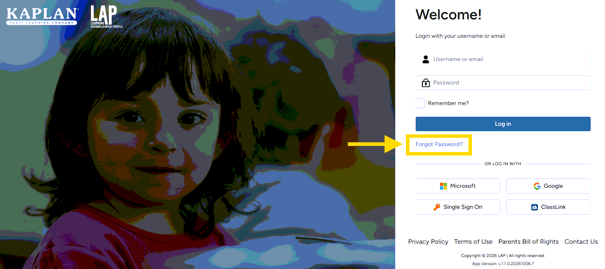
Where does a user log in?
What happens if a user cannot remember their password?
Refer the user to the Forgot Password link on the LAP Portal login page. This sends an email with a password reset link and instructions for resetting their password.
Tier 1 action: Direct the user to the Forgot Password link first. If they still need assistance, refer them to lapsupport@kaplanco.com.
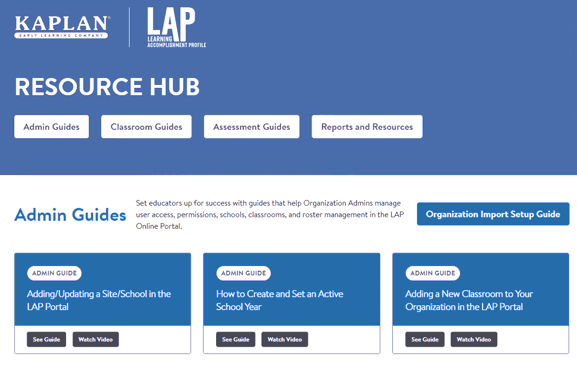
Where can users find setup and how-to support guides for the LAP portal?
Users can access guides and videos for portal setup and functions, including adding users, students, and classrooms.
- In the LAP portal: Select SUPPORT from the navigation menu.
- Direct link: LAP Resource Hub.
Tier 1 action: Use the portal SUPPORT menu or share the LAP Resource Hub before escalating basic how-to questions.
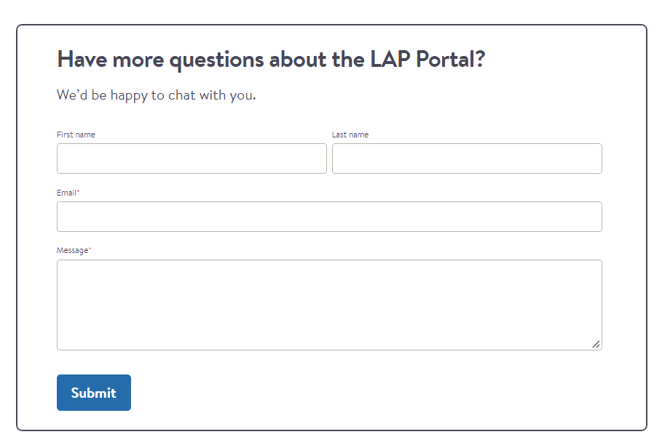
How can a user submit a technical support request?
Users can submit a support request ticket through the LAP Resource Hub, using the form at the bottom of the page, or email lapsupport@kaplanco.com. The request goes to the CAPL Customer Support pipeline, and a team member will follow up within 1–2 business days.
Tier 1 action: For issues beyond self-service resources, direct the user to submit a ticket through the LAP Resource Hub or contact lapsupport@kaplanco.com.
5. LAP Portal License Renewals
How does a customer renew?
Renewing customers may purchase the appropriate Online LAP licenses through the Kaplan LAP Online Portal website listing or contact LAP Support for assistance.
Tier 1 action: For renewal assistance, direct the customer to lapsupport@kaplanco.com
How many licenses should they renew?
One license is needed for each child who will be assessed during the new subscription period. Refer complex organizations, changing enrollment, or multiple-site questions to LAP Support or Sales.
Do they need another physical kit when they renew?
No. The physical kit and online subscription are separate purchases. A customer who already owns the appropriate kit does not need to repurchase it simply because the online subscription is renewing.
Do licenses automatically renew?
No. Licenses do not currently auto-renew.
6. Quotes & Large Purchases
Refer customers to their designated CAPL Sales Representative when they need:
- Support deciding which LAP instrument to purchase
- A sales quote.
- Multiple-site implementations
- Professional development or implementation planning
Tier 1 action: For these sales-related needs, refer the customer to their designated CAPL Sales Representative.
7. Quick Triage for Tier 1
| Customer says… | Recommended action |
|---|---|
| “I need to purchase the LAP assessment.” | Ask which LAP product they currently use and refer to the website for the kit and portal access. If new or unsure, refer to the designated CAPL Sales Representative. |
| “Do I need the LAP B-K kit?” | The physical kit is not required, but recommended for fidelity of the assessment; the Online LAP subscription is required for LAP B-K. |
| “Do I need another kit when I renew?” | No. The physical kit and annual online licenses are separate purchases. |
| “My portal is about to expire. How do I renew?” | Direct to the website to purchase additional licenses, to the CAPL Sales Representative, or to CAPL Customer Support. |
| “I renewed but cannot access the portal.” | Verify the order, then refer to CAPL Customer Support for technical assistance. |
| “How many licenses do I need?” | One license per child assessed; escalate complex implementations. |
| “Which LAP instrument should we use?” | Refer to CAPL Sales Representative. |
| “What does this score mean?” | Refer to CAPL Customer Support |
| “I cannot remember my password.” | Locate the Forgot Password link on the LAP Portal login page. |
| “Where do I find LAP Portal support and setup guides?” | Refer to the SUPPORT button in the portal to access the LAP Resource Hub. |
| “How do I get technical support?” | Submit a support ticket from the LAP Resource Hub or reach out to lapsupport@kaplanco.com. |
8. Key Links
| Resource | Link |
|---|---|
| Portal login | lap2.kaplanco.com/login |
| LAP Resource Hub | info.kaplanco.com/lap-resource-hub |
| LAP Landing Page for more information and online purchasing | kaplanco.com/lap |
| LAP Portal click-through demo, no login required | Learning Accomplishment Portal Overview |
9. CAPL Contacts
How do I contact CAPL Customer Support?
- Email: lapsupport@kaplanco.com
- Direct line: 1-888-808-2366 or Ext. 3487
When should I refer a customer to a CAPL Sales Representative?
Refer customers to their designated CAPL Sales Representative for product-selection questions, sales quotes, multiple-site implementations, professional development, implementation planning, and other sales-related questions.
10. CAPL Sales Reps
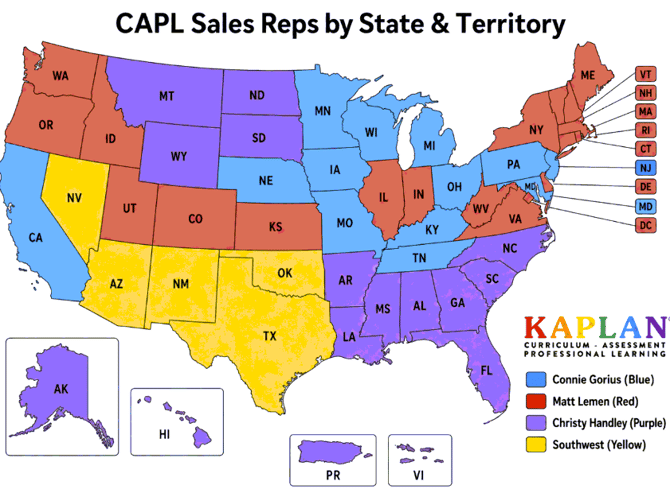
Use the contacts below when a customer needs product-selection guidance, a quote, or other sales-related assistance.
| Sales representative / territory | Email / routing | Extension |
|---|---|---|
| Connie Gorius | cgorius@kaplanco.com | 3470 |
| Christy Handley | chandley@kaplanco.com | 3478 |
| Matt Lemen | mlemen@kaplanco.com | 3471 |
| Southwest Territory | Refer to CAPL Customer Support until the position is filled. | — |
Internal Use | Kaplan LAP Tier 1 Guide | Updated October 2026