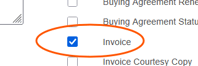
Note types may be used to add additional information to the note text itself. Certain notes may also publish on the Open List Report and can print on invoices and sales order reprints when identified with the correct note type and marked appropriately by checking the invoice box. The note text to print should be concise and customer friendly.
Order Note Types Reference
|
Note Type |
Description |
General Use / Guidelines |
|
ACCTCREDIT |
Apply on Acct Credit to Order |
Use when applying account credit to an order. |
|
ATTENTION |
Attn for Invoice |
Add “ATTN:” person/department name on the invoice (Bill To address). |
|
BILLING |
Billing Notes |
General billing-related notes. Can print on invoice and SO reprint if marked. |
|
BO |
Backorder |
Use to identify back ordered items. |
|
CALLER |
Caller Name and Phone |
Capture contact name and phone for web/phone orders. |
|
CCPEND |
Notified customer of failed CC |
Document communication to customers about failed credit card. |
|
CORRINV |
Corrected Invoice |
Use when referencing or explaining a corrected invoice. |
|
CREDIT |
Credit |
General AR credit applied. |
|
CREDIT_INS |
Credit Insurance on Order |
Use when credit insurance applies to an order. |
|
CSCENTRYER |
Customer Service Entry Error |
Document entry errors made by Customer Service. |
|
CUST |
Customer |
Generic customer-related notes. |
|
DATE |
Requested Date |
Capture or clarify requested ship/delivery dates. |
|
EDECA |
eDECA Data Administrator |
Use for eDECA data administrator-related notes. |
|
EDESSA |
Edessa |
Use for Edessa-related notes. |
|
ENTRYERROR |
Order Placement Entry Error |
Document order placement errors. |
|
EXPLAIN |
Service Detail dmg, def, not as exp |
Use when describing damage, defect, or “not as expected” issues. |
|
FG |
Free Goods |
Identify free goods on the order. |
|
FINANCING |
Financing |
Notes related to financing arrangements. |
|
FUNDING |
Funding |
Capture funding-related information (e.g., source of funds, requirements). |
|
GC |
Gift Card |
Notes related to gift cards. |
|
GRANT |
Grant Funding |
Use when order is tied to grant funding. |
|
INVMSG |
Message on inv-Check Recv, etc |
Invoice messages; can print on invoice and SO reprint if marked. |
|
ITEMCHG |
Item Change |
Document item changes (e.g., SKU change, replacement). |
|
NLA |
No Longer Available |
Flag items that are no longer available. |
|
OMBO |
Order Mgmt BO |
OM notes for backorders. |
|
OMCRDT |
Order Mgmt Credit Hold |
Use when Order Management has placed a credit hold. |
|
OMDS |
Order Mgmt DS |
General OM DS-related note. |
|
OMESTAT |
Order Management ESTAT HOLD |
Use when order is on ESTAT hold. |
|
OMFUT |
Order Mgmt Future Date |
For future-dated orders or releases. |
|
OMHOUSE |
Order Mgmt House Order |
Identify house orders. |
|
OMITEMCHG |
Order Mgmt Item Change |
OM-driven item changes. |
|
OMKEY |
Order Mgmt Key Acct |
Notes for key accounts handled by OM. |
|
OMNC |
Order Mgmt No Charge |
No-charge situations managed by OM. |
|
OMNLA |
Order Mgmt NLA |
OM notes for items no longer available. |
|
OMPG |
Order Playground Order |
Identify playground-related orders. |
|
OMPLAY |
Order Mgmt Playground |
Additional playground-related OM notes. |
|
OMQUOTE |
Order Mgmt Quote Hold |
Orders on hold pending quote resolution. |
|
OMSHORTPCK |
Order Mgmt Short Pick |
Document short picks (less than ordered shipped). |
|
OMSPCATTN |
Order Mgmt Special Attn Sheet |
Flag orders requiring Special Attention Sheet review. |
|
OMSPEC |
Order Mgmt – Time or Actions |
Use for time-sensitive OM actions or special handling. |
|
OMSUB |
Order Mgmt Sub |
Substitution-related OM notes. |
|
OMTRNG |
Order Mgmt Training |
Training-related OM notes. |
|
OMUPSELL |
Order Mgmt Upsell Items |
Document upsell items added by OM. |
|
OMWAIT |
Order Mgmt Cust Knows BO – Wants to wait |
Use when customer is aware of BO and chooses to wait. |
|
OMXLTARIFF |
Vndr Cancelled due to tariffs |
Vendor cancellations due to tariffs. |
|
ORDHLD |
Cust Hold Communication |
Capture communications related to customer holds. |
|
PRICING |
Pricing |
Notes about pricing decisions, overrides, or approvals. |
|
REALEBOOKS |
Realebooks Licenses Info |
Use for Realebooks license-related details. |
|
REBILLS |
Credit & Rebill Note Type |
Document credit-and-rebill situations. |
|
RMA |
Return Authorization |
Use for return authorizations and related details. |
|
RUSHREMOVE |
Rush was Removed |
Note when a rush designation has been removed. |
|
S |
Sub for Item Not Available |
Identify substitute item when original is unavailable. |
|
SALESENTRY |
Sales Entry Error |
Document sales entry errors. |
|
SPEC ATTN |
Special Attn Note |
Standard when a note is added by sales rep/customer to a “web/quote” order. |
|
SUB |
Substitution |
General substitution notes. |
|
TRAFFIC |
Notes for Traffic Dept |
Use for Traffic Department-related instructions or info. |
|
XXLBO |
Service Cancel Line(s) due to BO |
Identify cancelled lines due to backorder. |
|
XXLOTHER |
Service Cancel Line(s) other than BO |
Identify cancelled lines for reasons other than backorder. |
How Note Types Are Used
- Operational tracking: Order Management uses these notes to track reasons, contact points, and actions on open orders (e.g., holds, backorders, substitutions).
- Customer communication: Some notes drive what appears on invoices or reprints, helping ensure customers see key messages (e.g., invoice messages, attention lines).
- Internal communication: Note types drive awareness on who is managing the actin or what action may be needed (ATTN:, Traffic,)
- Issue documentation: Entry errors, damages/defects, financing, and funding details are consistently captured for future reference and reporting.
Field behavior & visibility
Notes with printing behavior (e.g., BILLING, INVMSG) will print on invoices and sales order reprints if the appropriate print option (select Invoices checkbox) is selected.
- Which note types:
- Print on invoices? Billing & INVMSG
- Print on packing slips? NONE
- Any system-specific flags that must be checked to print?
- The checkbox for “invoices” must be selected on associated note