
| Article information | Details |
|---|---|
| Product owner / department | CAPL Professional Learning |
| Tier 2/3 support contact | Professional Learning Team: professionallearning@kaplanco.com |
| Last updated | October 20, 2026 |
Quick Navigation
| Section | Use for |
|---|---|
| 1. At a Glance | Professional Learning options overview |
| 2. A La Carte Virtual Sessions | Live scheduled sessions, pricing, registration, Zoom links, and billing |
| 3. Self-Paced Online Courses | Course options, platforms, access, timing, and certificates |
| 4. Private Virtual & In-Person Sessions | Custom organization sessions, quotes, planning, and referrals |
| 5. edWeb: Free Professional Learning | Free webinars, recordings, CE certificates, and support |
| 6. Purchasing & Escalation | Billing paths, routing, and quick Tier 1 triage |
| 7. CAPL Contacts | Professional Learning support and CAPL Sales referrals |
1. Professional Learning At a Glance
What Professional Learning options are available?
Kaplan Professional Learning is available through live scheduled sessions, self-paced online courses, dedicated private sessions, in-person professional learning, and free edWeb webinars. A customer-facing overview of Kaplan Professional Learning offerings is available on the Kaplan website: Explore Professional Learning Solutions.
Website pathway: Professional Learning > Explore Professional Learning Solutions
A CAPL Sales Representative and a member of the Professional Learning Team will gather information about the customer’s group size, schedule, delivery preference, and purchasing needs to identify the right path.
Important: Some calls are intended for Kaplan Test Prep, not Kaplan Early Learning. Our offerings cover our curriculum, assessments, and early childhood topics only.
| Option | Best for | Format | Purchase / access | Topics |
|---|---|---|---|---|
| A La Carte Virtual Live Sessions | Individuals or small groups | Live virtual, by-seat registration | Kaplan website - Event Registration | Connect4Learning, LAP, Learn Every Day, and early childhood topics |
| Self-Paced Online | Flexible, asynchronous learning | Canvas or external partner platform | Kaplan website - product landing pages | Connect4Learning*, LAP, Learn Every Day, Environmental Rating Scales, EfGo, and DECA |
| Private Virtual | One organization or a larger group | Live, synchronous, dedicated Zoom session | Professional Learning quote from CAPL Sales Representative | Connect4Learning, LAP, Learn Every Day, and early childhood topics |
| In-Person | Customized on-site, hands-on team learning | In-person sessions, conferences, and keynotes | Professional Learning quote from CAPL Sales Representative | Connect4Learning, LAP, Learn Every Day, and early childhood topics |
| edWeb | Free webinars and on-demand resources | Live and past edWebinars | Free; no Kaplan purchase required | Early childhood topics |
The Connect4Learning Online Course is included in the Connect4Learning portal and is not a separate purchase.
Tier 1 action: For a la carte live sessions, self-paced courses, and edWeb, direct customers to the respective pages on the Kaplan website. For private virtual, in-person, custom, large-group, coaching, or “not sure” requests, refer the customer to their designated CAPL Sales Representative.
2. A La Carte Virtual Sessions
What are A La Carte Virtual Sessions?
These are live virtual sessions sold by the seat through Kaplan Event Registration. This is the simplest option for individual educators or small groups that can attend an already-scheduled session.
Website pathway: Professional Learning > Register for Professional Learning
Note - Due to the number of trainings offered on the Event Registration page, customers will need to click on the down arrow (v) next to each professional learning topic to expand the section and see the specific offerings.
| Detail | Current standard |
|---|---|
| Format | Live virtual, by-seat registration; held on Zoom |
| Typical length | Most sessions: 2 hours. Connect4Learning Implementation: 4 hours. Free LAP or Connect4Learning Online Portal Overview sessions: 1 hour. |
| Typical price | $55 per participant for 2-hour sessions. Connect4Learning Implementation only: $90 per participant for the 4-hour session. Connect4Learning and/or LAP Online Portal Overview sessions: free. |
| Available topics | Connect4Learning; Learn Every Day; early childhood topics; Learning Accomplishment Profile |
| Time zone | All sessions are listed in Eastern Time. |
How customers purchase
- Browse the current schedule and register at Kaplan Event Registration. Website pathway: Professional Learning > Register for Professional Learning.
- Choose the session and seats. The registration page shows the date, time, location, cost, and Register action.
- Enter participant and payment information. Payment information is collected when the customer registers.
- Attend the session. For a la carte events, the card is charged after the session is complete. Zoom links are sent to participants 1–2 business days before the session.
Downloadable schedule: Professional Learning schedule
Tier 1 action: If registration is closed, escalate internally to the Professional Learning Team / Heather Robbins for assistance or alternatives. Contact professionallearning@kaplanco.com.
A La Carte live session FAQs
I registered for a live session. When will I receive my Zoom link?
Zoom links and session information are sent by a member of the CAPL team 1–2 business days before the scheduled session. If a customer has not received their Zoom link, contact Heather Robbins
When will I be billed for the live session?
Payment information is collected at registration, but the card is not charged until after the session is complete.
Will I still be billed if Kaplan cancels the session due to low enrollment?
No. If Kaplan cancels the virtual session due to low enrollment, the customer is not charged. A member of the CAPL team will contact the customer to offer rescheduling. If rescheduling is not an option, the order will be canceled.
Can I receive a certificate for live sessions?
Yes. Request course certificates after the session at professionallearning@kaplanco.com.
3. Self-Paced Online Courses
What are Self-Paced Online Courses?
These are asynchronous courses that customers complete on their own schedule. Some are managed by Kaplan in Canvas; others are sold by Kaplan but delivered and managed by partner organizations.
Course options
| Course family / example | Platform / manager | Course hours | Reference price / purchase path |
|---|---|---|---|
| C4L Online Implementation | Kaplan / Canvas | 6.0 | Included with online portal purchase |
| LAP B-K online course | Kaplan / Canvas | 3.0 | $120. Purchase on the website or via quote from a CAPL Sales Representative. |
| Kaplan / Canvas | 2–3 | $30 each. Purchase on the website or via quote from a CAPL Sales Representative. | |
| ERS 101 family: ECERS, FCCERS, ITERS, SACERS | Branagh Group | 5.0 | $149. Purchase on the website or via quote from a CAPL Sales Representative. Additional courses will be added soon. |
| Building Your Bounce Online Course | Devereux | 2.5–3.0 | $30. Purchase on the website or via quote from a CAPL Sales Representative. |
| EFGo Complete Curriculum Online Course | EFGo | 2–3 per course | $249; volume pricing available. Purchase on the website or via quote from a CAPL Sales Representative. |
| EFGo individual modules | EFGo | 2–3 | $49; volume pricing available. Purchase on the website or via quote from a CAPL Sales Representative. |
Tier 1 action: For help selecting a self-paced course, refer the customer to their designated CAPL Sales Representative. For access issues, contact CAPL Customer Support.
Self-paced course FAQs
What happens after a self-paced course is purchased?
The customer receives an automated email stating that the course invitation will be sent within 1–2 business days and outlining next steps.
How quickly will a user be set up for a Kaplan Canvas course after purchase?
An invitation to the course will be sent within 1–2 business days of receipt of the order.
Are certificates available for all self-paced courses?
Yes. Certificates are available and emailed to the customer after a user completes the Canvas course. The certificate includes the course title and number of course hours. Certificate delivery is within 1–2 business days of completion via email.
How do customers receive the certificate after completing the course?
The customer notifies Kaplan, and a certificate will be emailed within 1–2 business days after completion.
4. Private Virtual & In-Person Sessions
How are private virtual and in-person sessions purchased and scheduled?
These sessions are quote-based and require coordination between the customer’s CAPL Sales Representative and the Professional Learning Team, Laura Wilhelm and Lori Doriot.
Tier 1 action: Refer all private virtual and in-person Professional Learning inquiries to the designated CAPL Sales Representative. The Sales Representative gathers preliminary information and shares it with the Professional Learning Team, who coordinates session details.
For Professional Learning billing and invoice questions, contact Heather Robbins at hrobbins@kaplanco.com.
5. edWeb: Free Professional Learning
What is Kaplan’s edWeb Professional Learning option?
Kaplan sponsors a professional learning community on the edWeb platform. This is a free option for educators looking for webinars, an on-demand resource library, and CE certificates.
| Feature | Tier 1 answer |
|---|---|
| Cost | Free |
| Platform | edWeb |
| Kaplan community | Practical Strategies for Early Learning |
| What users get | Live and past webinars, a 24/7 resource library, and access to experts and the community |
| Certificates | Free CE certificates for attendees and webinar viewers |
| Purchase required? | No Kaplan purchase is needed to join the edWeb community. |
Kaplan edWeb page: Free Webinars
Website pathway: Professional Learning > Free Webinars
edWeb FAQs
How do I see what edWeb sessions are available?
Visit the Kaplan edWeb landing page to see upcoming webinars, and join the Kaplan edWeb community to register.
I registered for an edWeb but then couldn’t attend. Can I get the recording?
All registrants receive an email after the session with the session recording. Recent recordings are also available on the Kaplan edWeb landing page and in the edWeb community.
How do I stay on top of edWeb offerings?
Join the Kaplan edWeb community to receive email updates with new sessions. Visit the Kaplan edWeb landing page, click Join the Community, and follow the prompts to create an edWeb account.
Are edWeb certificates available?
Yes. edWeb transcripts and certificates are available after the user completes a session in their edWeb account.
What do I have to do to earn a certificate?
To earn a CE Certificate for 1 clock hour:
- View the program live or as a recording for 40 minutes or more.
- Pass the CE Quiz.
- Complete the PL Plan.
Users can track required activity and download the CE Certificate on the edWebinar Transcript page. CE Certificates are awarded once for each program.
Does my state accept edWeb certificates for continuing education credits?
Possibly. Refer the customer to the edWeb CE Certificate State Information guide for state requirements.
What if I have additional questions or need technical support?
Refer to the edWeb FAQs for certificates, recordings, account support, and more. For additional support, contact help@edweb.net.
Tier 1 action: For edWeb account, transcript, certificate, or technical issues, direct the customer to edWeb Support at help@edweb.net.
6. Purchasing & Escalation
How should Tier 1 route Professional Learning questions?
Use the customer’s question, not just the product name, to decide the destination.
| Question / need | Route to | Contact | Send these details |
|---|---|---|---|
| Private virtual/in-person planning, custom topic, group quote, or trainer availability | CAPL Sales Representative | Customer’s designated CAPL Sales Representative | Customer name, contact information, and state |
| A la carte registration closed / quote exception support | CAPL |
Heather Robbins - hrobbins@kaplanco.com |
Session title/date, customer number, and customer contact information |
| Self-paced Canvas course access | CAPL Customer Support | Lisa Williford - lwilliford@kaplanco.com | Course/item number, participant name/email, order number, and purchase date |
| External self-paced provider course access (i.e. ECERS, EFGo, Building Your Bounce) | Professional Learning / self-paced course owner, then provider as appropriate |
Branagh / Devereux / Reflection Sciences, according to course Branagh Contacts (ERS-101 Courses): |
Course/item number, participant email, order number, and access issue |
| edWeb questions and technical support | edWeb Support | help@edweb.net | Not specified in the source guide |
Purchasing quick reference
Professional Learning has more than one purchase path. The fastest way to solve a billing question is to identify how the service was purchased before discussing payment timing.
| Purchase type | How it is purchased | Billing / payment basics |
|---|---|---|
| A la carte live virtual | Online event registration, by seat, on the Kaplan website | Payment information is collected at registration; the card is charged after the session. No charge if Kaplan cancels due to low enrollment. |
| Self-paced online course | Kaplan website | Payment information is collected at purchase and billed. |
| Private virtual | Quote/order coordinated through CAPL Sales Representative | Quote-based. Payment information is collected before the session but is not marked to bill until after the session is complete. |
| In-person | Quote/order coordinated through CAPL Sales Representative | Quote-based. Payment information is collected before the session but is not marked to bill until after the session is complete. |
| edWeb | Free community/webinar access | No Kaplan purchase or invoice. |
Quick triage for Tier 1
| Customer need | Best next step |
|---|---|
| Wants a scheduled live virtual session | Direct to Kaplan Event Registration. |
| Registration is closed | Escalate to the Professional Learning Team / Heather Robbins. |
| Needs a private virtual or in-person session | Refer to the designated CAPL Sales Representative. |
| Needs a Professional Learning quote or help choosing | Refer to the designated CAPL Sales Representative. |
| Needs a self-paced course | Direct to the course item on Kaplan’s website; use Sales for quote/volume needs. |
| Cannot access a Kaplan Canvas course | Route to Lisa Williford / internal course owner with order and participant details. |
| Cannot access a partner-managed self-paced course | Identify the provider (Branagh, Devereux, EFGo) and route to the course owner/provider. |
| Needs edWeb help | Direct to the edWeb FAQs or help@edweb.net. |
7. CAPL Contacts
How do I contact Professional Learning support?
Email professionallearning@kaplanco.com
For registering for Virtual A La Carte sessions after registration is closed OR needs a Zoom link - Heather Robbins, hrobbins@kaplanco.com
For questions about Canvas self-paced course access - Lisa Williford, lwilliford@kaplanco.com
Key Links
| Resource | Link | Kaplan website pathway |
|---|---|---|
| Professional Learning overview | Explore Professional Learning Solutions | Kaplan Website > Professional Learning > Explore Professional Learning Solutions |
| A la carte event registration | Kaplan Event Registration | Kaplan Website > Professional Learning > Register for Professional Learning |
| Free edWebinars | Free Webinars | Kaplan Website > Professional Learning > Free Webinars |
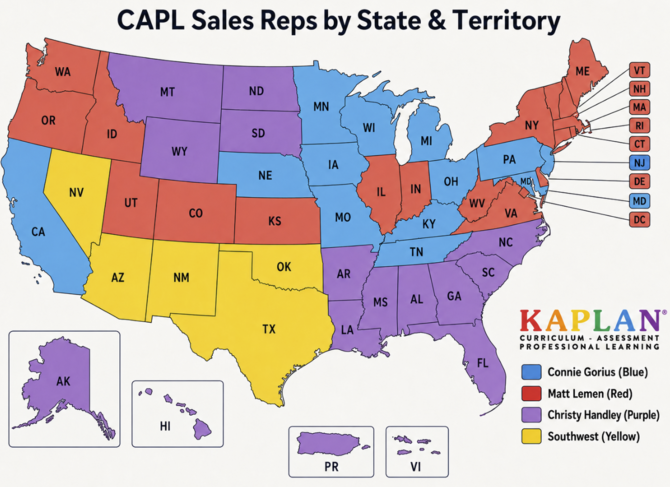
CAPL Sales Representatives
Use the customer’s designated CAPL Sales Representative for private virtual/in-person professional learning, custom topics, group or volume quotes, trainer availability, and other sales-related Professional Learning needs.
| Representative / territory | Email / referral | Extension |
|---|---|---|
| Connie Gorius | cgorius@kaplanco.com | 3470 |
| Christy Handley | chandley@kaplanco.com | 3478 |
| Matt Lemen | mlemen@kaplanco.com | 3471 |
| Southwest Territory | Refer to professionallearning@kaplanco.com until the position is filled. | — |
Internal Use | Kaplan Professional Learning Tier 1 Guide | Updated October 2026