
If the request comes through HS, please select "Savings Pass" as the category on the ticket.
When to Use This
An agent may send a Savings Pass coupon in the following situations:
- As a service recovery solution for an upset customer
- When a customer requests a coupon / discount and the agent feels it is warranted
{This should not be used randomly to any customer who asks for a discount} - When a customer says they did not receive their coupon code from a sales representative during a conference
- When a customer is experiencing issues with a coupon code they previously received
Important Notes
- The coupon code sent through this process is a one-time use code.
- A customer may receive and use multiple different codes, as long as each code is only used once.
- The coupon is intended for use on the website during checkout.
How to Send the Savings Pass Coupon
- Locate the email field in the Savings Pass tool or form (see bottom of the article).
- Enter the customer’s email address carefully.
- Submit the request.
- The system will generate and send an email to the customer with a coupon code.
- Advise the customer to check their inbox for the email and use the code at checkout on the website.
What the Customer Receives
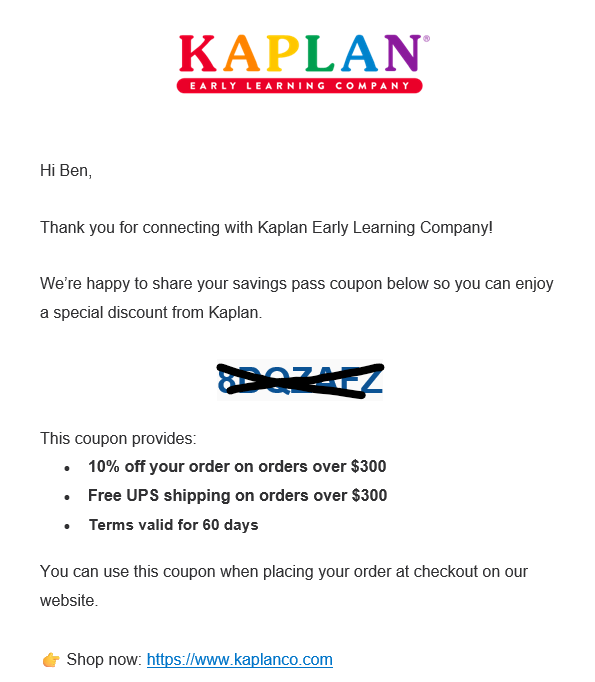
The email sent to the customer includes:
- Their unique Savings Pass coupon code
- 10% off an order over $300
- Free UPS shipping on orders over $300
- Terms valid for 60 days
- A link to shop on KaplanCo.com
Offer Terms
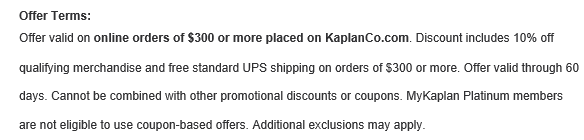
The Savings Pass offer is valid on online orders of $300 or more placed on KaplanCo.com.
The offer includes:
- 10% off qualifying merchandise
- Free standard UPS shipping on orders of $300 or more
Additional terms:
- Valid for 60 days
- Cannot be combined with other promotional discounts or coupons
- MyKaplan Platinum members are not eligible to use coupon-based offers
- Additional exclusions may apply (see exclusions on website)
Suggested Agent Guidance
When speaking with or replying to the customer, you may say:
I can send a Savings Pass coupon to your email. Once I enter your email address, you’ll receive a message with a code you can use on our website at checkout. Each code is one-time use, but if you receive more than one code, each valid code can be used separately.
Best Practices
- Confirm the customer’s email address before submitting
- Remind the customer to check spam or junk folders if they do not see the email
- Clarify that the code must be entered during checkout on the website
- If the customer reports an issue with a previously received code, send a new code if appropriate based on policy
Sales Representatives will refer to this code as a coupon code where internal service and order teams will refer to it as savings pass.
Sample look of email:
 Exclusions at bottom of email:
For awareness: the code populates into PS as ONEXXXX26 promo code field for orders, where x indicates hidden letter.
Effective 03-2026